


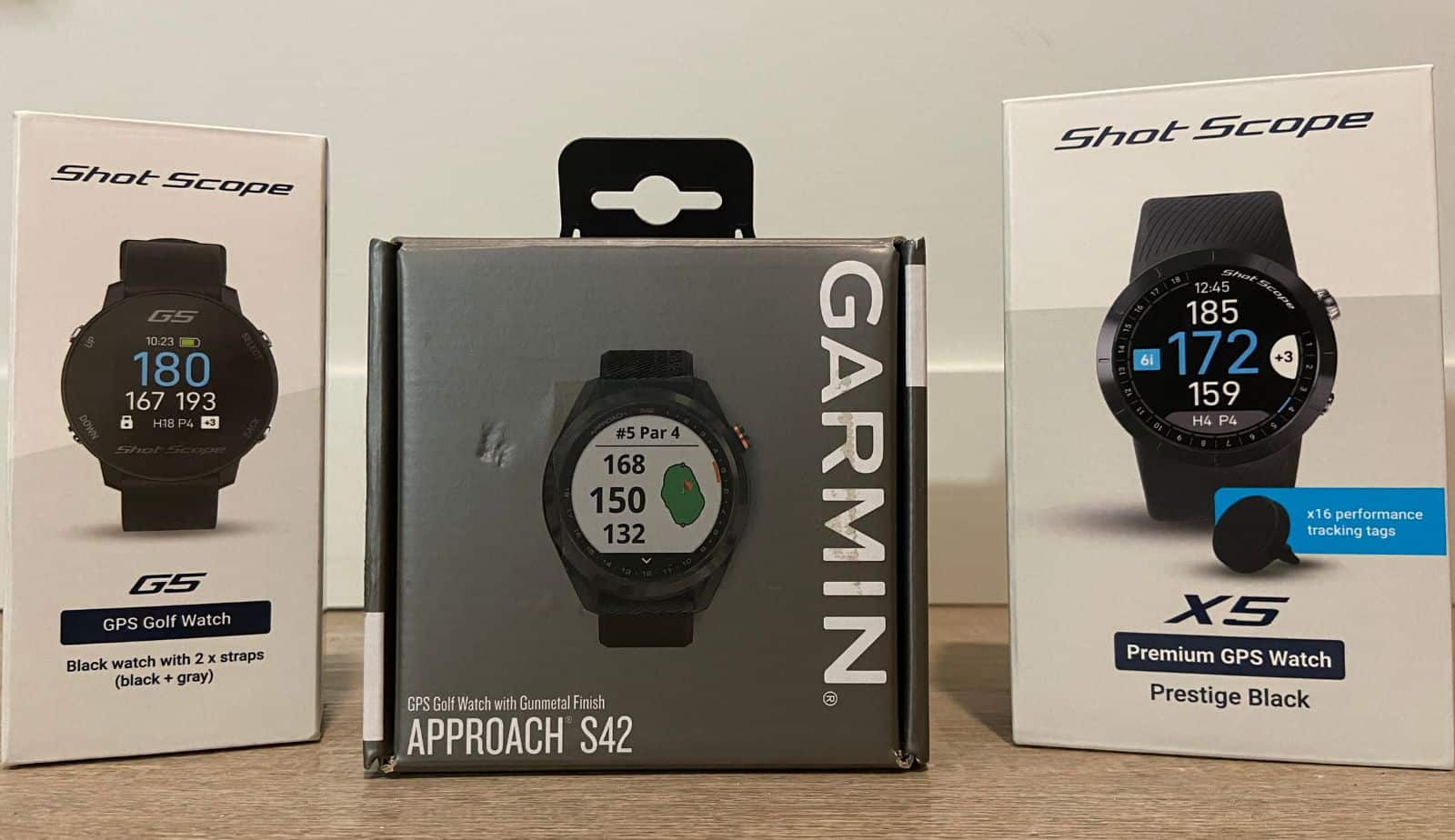
When it comes to golf watches, the main two brands I’ve used are Garmin and Shot Scope. Before the X5, my go-to choices were the Garmin S42 and Shot Scope V3.
Both have been solid watches, but they do have some downsides. My hope is that the X5 will combine the two to make the ultimate golf watch.
The main issue with the S42 is that it’s not as automatic as the V3. The main problem with the V3 is that it’s not as sturdy and well-built as the S42.
To see how the X5 compares, I’ve been using it for the past couple of months (11+ rounds). We’ll be going over everything that I’ve found and I’ll let you know if it’s worth picking up.
You can see our favorite golf GPS units HERE.
Shot Scope X5 Product Details
| Full Hole Maps | Yes |
| Distances | F/M/B Green F/B Hazards 200/150/100 Layup Doglegs |
| Slope | No |
| Green View | No |
| Pin Placement (move pin) | No |
| Scorecard | Yes |
| Step Tracker | No |
| Performance Tracking | No |
| Subscription | No |
| Courses | 36,000+ |
| Touchscreen | No |
| Watch Diameter | 1.7″ |
| Weight | 42 Grams |
| Battery Life | 8 Hours |
| Company Website | Shot Scope |
The First Impressions

I have a decent amount of experience with Shot Scope after using the V3 watch for over 2 years. In terms of GPS units, they’re probably my favorite brand.
The main reason is that you get GPS + performance tracking data, all without a subscription. If you go with Garmin, you’ll need one of their watches and the CT10 sensors (expensive). If you go with Arccos Caddie, you’ll have to buy the sensors and then pay an annual fee (annoying).
With Shot Scope, you buy the watch and it comes with performance tracking sensors and free updates (no subscription).
Back to the V3 watch…
I always had a good experience with it, but there were a few things that could be improved. The first was that it wasn’t the best looking and couldn’t be used off the course.
In the picture below, you can see the differences between them. The older V3 is square and pretty much only has golf features. The newer X5 is round and comes with an actual watch face and step counter. It also has a more heavy-duty and comfortable strap.

The second was that it didn’t come with a live scorecard. You could see your score after the round (in the app) but would have to write it down if you wanted to know during. Not a huge deal, just annoying.
The X5 not only has this feature, but it also comes with more advanced stuff as well. The main thing for me was the personalized hole maps, which we’ll talk more about later.
Note. Shot Scope also has the V5 watch that’s very similar to the X5. The main difference is that the X5 uses a touchscreen while the V5 uses buttons.
The Setup

When you open the box, you’ll find the watch, the tracking tags, the charger, and the instructions. Everything was packaged nicely and securely, which is what you’d expect with a product like this.

The first thing you’ll need to do is screw each of the tags into the grips of your clubs. This is how the watch tracks your performance and distances. “D” is for driver and “P” is for putter.

You’ll then want to charge the watch. One thing I don’t like about Shot Scope is that they use their own charger. It would be so much nicer if they just used a USB-C charger that everyone else does.

Installing the app and connecting your watch is pretty simple as well. Once you download the app, you’ll then create a free account and follow the instructions for pairing your watch.
It’s also a good idea to go to the app and subscribe to the courses you normally play. If your course isn’t available, you can contact Shot Scope and they’ll usually get it done within 3-5 days.
The final thing you can do is set up your bag in the app. Find the “My Bag” section and add your clubs. You don’t have to do this, but it just makes things a little easier and more organized.
Using On Course
I’d recommend that you turn the watch on and pick the course you’re playing 5 minutes before your tee time. It usually takes 1-3 minutes to connect, but it can sometimes take a bit longer. You also don’t want to do it earlier because it could track your practice swings (you can also use the “Pause Track” feature).
It just takes a few clicks to get started. You’ll hit the “Play Golf” button and then pick what mode you want to use, GPS or GPS + Track.

GPS Mode: This is the most basic mode and is used if you just want GPS data (without performance tracking). You’ll get the distance to different parts of the course.
GPS + Track Mode: This is the mode to use if you want to also track your performance. Things such as shot distances, GIR/FIR percentage, common misses, and a number of other things will be tracked.
Once we’re on the course, the X5 will give you most of the info you’d want. I don’t use every feature myself because I either don’t really care about it or it’s just not that helpful. Let’s go over my favorite features and what I use the most.
Distance to the front, middle, and back of the green: This is the most useful feature on a golf watch and is super important if you’re looking to become more consistent.

I prefer this over a laser rangefinder because it gives you a range that you need to hit. If you use a rangefinder, you’ll get the distance to the flag but not the front/back of the green. I find that having a range improves the margin of error and it’s helped me end up on more greens.
You can also adjust where the pin is located to get a precise distance. I don’t use it often just because it’s inconvenient, but it’s good if you want to dial in your distances.

Distance to the front and back of hazards: This is another useful feature that I use quite a bit. A GPS watch is sometimes the only option for getting this info. Sometimes you can’t get a clear shot of the hazard with a rangefinder.

You’ll get the distance to the front of the hazard as well as the distance to clear it. On a GPS without hole overview, I’ve found this feature not useful at times. It’ll just give you a number and sometimes you can’t figure out which hazard is which (if there are multiple bunkers, for example).
Plus, hazards can be different shapes and it could be 150 yards to clear one section and 155 to clear a different section (this is where a rangefinder could be more useful). Having a view of the hole makes it a lot easier though.
Distance to layups and doglegs: Knowing the distance to doglegs is helpful off the tee. Knowing the distance to layup spots is helpful on par 5’s.

I’ve been practicing my 100 and 150 yards shots quite a bit over the past year. A lot of the time, I can’t reach the green in 2 shots on longer holes. Rather than hitting a fairway wood and maybe getting it close, why not just hit an iron to the 100 yard mark?
The X5 will give you the distance to wherever the dogleg is and will also tell you how far it is to the 100, 150, and 200 yard layup.
Scorecard: The previous V3 didn’t have a live scorecard so you’d still have to use pen and paper. I’m glad to see that they’ve added that feature here and you can now see your live score during your round.

Shot distance: The only way to know your true shot distance is by using a GPS device. If your buddy claims they hit their driver 290 yards, you can use it to fact-check them. After you hit your shot, go to the “Last Shot” feature, walk up to your ball, and it’ll tell you how far you hit the ball.

Personalized hole map: This is a really cool feature and is one of the things that differ between the X5 and V5 watches. This alone could be worth the extra cost.

After you use the X5 for a while, your average distances will be calculated in the app. You can then use personalized hole maps to see where each club will reach.
It’ll give you an overhead view of the hole. It’ll overlay where your 3 longest clubs will reach so you can make the best possible choice.
The Shot Scope App

Once you’ve finished your round, you’ll need to go to the app and sync your round. You’ll then have access to all your data.
I will admit that the app/website could use some work and a lot of the data won’t be useful to most people. That said, it’s been getting better and if there’s data you want to know, you’ll probably find it.

Here are a few things I look at in the app:
- Distances for each club: average distance, longest distance, and p-average (average without mishits)
- Shot dispersion data: where you’re most likely to miss and what areas of your game need improvement
- Strokes gained data: for each club compared to other golfers at your skill level
You also have the MyStrategy feature, which is pretty cool. This is what you can use before your round to figure out which club is best to hit.

It’ll give you an overhead view of the course, then you can overlay the performance average for each club. You can see how far each club will go, and where your average dispersion could end up.
I don’t have the time to use this feature a lot, but I do it for the courses I play a lot. It’s not perfect, but it’s one of the most useful features I’ve seen for someone who wants to dial in their game.
The Battery Life
Having a watch that lasts multiple rounds is nice and all, but I don’t know how important it is to the average person. Most people don’t play multiple rounds per day, but if you do, having one that’ll last is important.
In my experience, the X5 probably won’t last 2 rounds. The last time I played, my battery was at 65% after 9 holes (GPS + Tracking).
If you play quick and only use GPS mode, you might be able to squeeze 2 rounds, but on a slow round, it’s not likely.
The Pros & Cons
After using the X5 for a while now, there are things I like about it and things that could be improved (just like anything else). I’m going to list below some of the random things I like and dislike.
The Pros:
- The screen is bright and easy to read
- It’s consistently accurate
- The amount of data you get is next-level
- You don’t have to pay for a subscription
The Cons:
- It doesn’t feel quite as premium as Garmin, Samsung, or Apple watches
- The watch and app can occasionally glitch and will need to be reset
- It’s not as responsive as a smartwatch from Apple or Samsung
- It sometimes doesn’t track right and needs to be updated after. The difference between Shot Scope and Garmin is that Garmin requires manual input so it’ll always be accurate. Shot Scope is automatic but can sometimes miss shots.
Shot Scope X5 vs V5
Both of these are premium offerings from Shot Scope that have a lot of the same features. The X5 is somewhere around $100 more than the V5, but it has a few extra features that are pretty cool.
The first difference between them is that the X5 uses a touchscreen (you can also use the button if you prefer) while the V5 uses buttons. Personally, I prefer buttons because it’s going to be more durable and the battery might last a little longer.
Everyone is different though. Some people prefer a touchscreen.
The second difference is that the X5 comes with personalized hole maps while the V5 comes with standard hole maps. This is the main thing to consider.
Both watches show you an overhead view of the hole. The X5 will take your average distances and overlay them on the map to show where each club will reach. You’ll easily be able to see if your driver will get over the hazard or if you should layup.
Everything else between the watches is the same. If you think the personalized maps are worth $100, get the X5. If not, the V5 is the better option.
Should You Buy The Shot Scope X5?
Over the years, I’ve used a number of GPS units from brands like Shot Scope, Garmin, Arccos, and SkyCaddie. Each of them has their pros and cons, but they’ve all been pretty solid products.
In my experience:
- Garmin has the best hardware
- Arccos has the best software
- Shot Scope is in the middle for both
If the choice was up to me, and I wanted a GPS and performance tracker, Shot Scope is what I’d go with. In the long run, Garmin and Arccos will be a lot more expensive. You can see our full comparison HERE.
The question then comes down to picking the X5 or V5. If you really like the idea of personalized hole maps, the X5 is what you should get. If I could go back in time, I’d probably go with the V5.
The main reason is to save a bit of money. On top of that, I think buttons are more durable and usually cause fewer problems compared to touchscreen. The battery will also last a bit longer.
Shot Scope does have some things to work out and improve, which you can see from the 2023/2024 reviews. The good news though is that I’ve seen a lot of improvements over the years. If that’s any sign, they’ll continue doing so in the future.
If you have any questions or want to share your experience with any of the Shot Scope products, make sure to leave a comment below.
15% OFF THE SHOT SCOPE X5
Click the link below and use code “OOBGOLF” to save 15% on your order.
If you use our code, we’ll get a small commission, at no extra cost to you. It doesn’t impact our review or recommendation in any way.
Other Golf Watches You Should Consider
If you don’t care about performance tracking, or you don’t want to spend this much, there are other options to consider. We have a guide that goes over our favorite GPS units and which one could be right for you.

What To Do Next:
Enter Our Gear Giveaway: Like free golf stuff? A few times per year, we pick a few of our viewers and send them some gifts. Click here to learn more.
Deals & Discounts: We’ve worked with brands to offer discounts to our readers. See our deals and discounts page to see our current promotions.
Write For Us: Calling all hackers, whackers, and golf enthusiasts. Out Of Bounds Golf is looking for writers. If you’d like to get paid to write about golf, click here for more info.
